
How to Photograph Your Jewelry and Watches
Phone camera techniques for sharp, honest photos of pendants, rings and watches: light, backgrounds, focus, angles, video and light editing.
Quick Facts
Clean two things first
Wipe your phone’s camera lens. It sounds too obvious to mention, but a lens that lives in a pocket picks up a film of skin oil that turns every bright stone into a soft, hazy glow. A microfiber cloth fixes it in five seconds and does more for your photos than any setting.
Then clean the piece. At close range a phone shows everything: dust on the dial, lint caught in a prong, fingerprints on polished metal, a film of lotion that makes moissanite look cloudy. Wash it with warm water and a drop of mild dish soap, dry it with a lint-free cloth, and handle it by the edges afterward. Our guide to cleaning an iced out watch has the full method for watches.
Light: one kind for color, another for sparkle
Most disappointing jewelry photos are lit badly rather than shot badly. There are two kinds of light worth knowing, and they do different jobs.
- Soft, diffuse light from a window on an overcast day, or through a thin curtain, shows the true color of the metal and the shape of the piece. It is the light to use when you need an honest record.
- A small, bright point of light makes stones sparkle. The flashlight on a second phone, a small LED lamp or direct sun all work. Moissanite has strong dispersion, so a point source brings out its colored fire in a way soft light never will.
Many of the best photos use both: a window for the overall look, plus a small light aimed at the stones from the side.
Avoid mixing light sources of different color. A warm lamp in one corner and daylight from a window will give white metal a blue cast on one side and a yellow cast on the other. Pick one, and turn the other off.
A simple tabletop setup
You do not need a lightbox. A table near a window, a sheet of black card and a sheet of white card cover most needs.

- Put the window to one side of the table, not behind the piece and not behind you.
- Lay the piece on the dark card.
- Stand the white card on the side opposite the window. It bounces light back into the shadows so the far side of the piece does not go black.
- Hold or prop the phone just above the piece, tilted slightly, and brace it so it stays still.
Polished metal and watch crystals act like mirrors, and you will often see your phone and your hand reflected in them. A piece of black card held behind the phone, with a small hole cut for the lens, removes most of those reflections.
Backgrounds
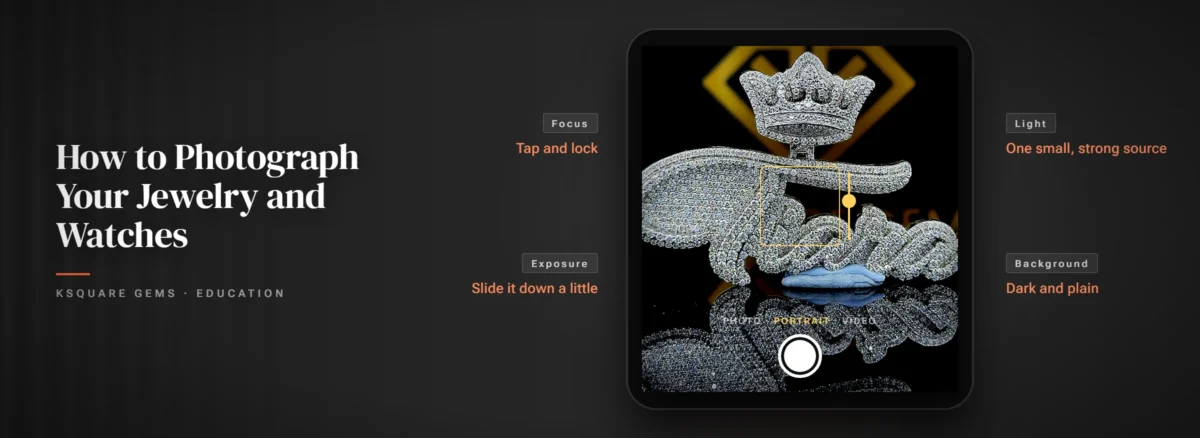
For moissanite and iced pieces, a dark matte background is the most flattering choice. Stones look brightest against black, and colored flashes of fire show up clearly. Black velvet, matte black card or a dark slate tile all work. Avoid glossy surfaces, which add their own reflections.
White backgrounds suit catalog-style photos and make metal color easy to judge, but they can make clear stones look flat or gray. Busy patterns, wood grain and bedsheets pull attention away from the piece.
Focus, exposure and distance
Phone cameras are built for faces and landscapes, and shiny objects confuse them. Take control:
- Lock focus on a stone. On many phones, tapping the screen sets focus and pressing and holding locks it. Lock it on the center stone or the dial.
- Bring the exposure down. Bright stones and polished metal trick the camera into overexposing. Once focus is locked, slide the exposure control down slightly. A touch darker keeps detail in the sparkle and makes the background properly dark.
- Do not get too close. Every lens has a minimum focus distance, and inside it the picture goes soft. If the image blurs as you move in, back off and use the 2x or 3x zoom if your phone has a telephoto lens. It also gives more natural proportions than shooting close with a wide lens.
- Keep the phone still. Prop it against something and use the self-timer, so tapping the shutter does not shake the shot.
Angles for each type of piece
| Piece | Must-have shots | Why |
|---|---|---|
| Pendant | Straight on, three-quarter angle, side | The side shot shows depth and the bail |
| Ring | Top view, profile, on the finger | The profile shows setting height and band width |
| Watch | Dial straight on at 10:10, three-quarter, on the wrist | The wrist shot shows real size |

Watches are photographed at around 10:10 for practical reasons. The hands form a neat V that frames the top of the dial, they stay clear of each other and of the logo area, and if the watch has a date window at 3 o’clock, it stays uncovered. Set the time before you start and leave the crown pushed in, so it sits flush in the shot.
Video shows sparkle better than any photo
Sparkle is movement. Light hits a facet, flashes and goes dark as the angle changes, and a still photo only catches one moment of that. A short video does it justice.
- Use the point light and the dark background.
- Move slowly. Rotate the piece by a few degrees, or keep it still and move the light. Fast movement just looks blurry.
- Keep clips to about 10 to 15 seconds, at the highest resolution your phone records.
- Use the lens buttons, such as 2x or 3x, rather than pinching to an in-between zoom, which is digital and loses detail.
Edit lightly, and keep it honest
Crop, straighten, and adjust exposure and contrast a little. Correct white balance so white metal looks white. Stop there. Pushing saturation or clarity makes moissanite look artificial, and sparkle filters are easy to spot.
Honest photos matter most when they are a record. For resale or insurance, take a clear set of every piece in soft light, plus close-ups of any stamps (such as 925 or 14K), the watch caseback, any visible wear, and one shot next to a ruler for scale. Keep them with your receipt and back them up somewhere other than your phone. The same daylight close-ups are what to send if you ever need to report a problem with an order, as described in What to Check When Your Order Arrives.
For more on how moissanite handles light, read Fire and Brilliance, What Is Moissanite? and Moissanite Cuts and Shapes.
Frequently Asked Questions
Usually a dirty lens or a film of oil on the stones. Wipe the phone lens, clean the piece with warm soapy water, and photograph it under a small point of light against a dark background.
No. The phone flash flattens metal, glares on watch crystals and blows out the stones. A window plus a small light from the side gives much better results.
The hands frame the top of the dial in a balanced V, stay clear of each other and the logo area, and keep a date window at 3 o'clock visible.
Clear photos of each piece in soft light, close-ups of stamps and any caseback details, a shot next to a ruler for scale, and your receipt. Back them up off your phone.




Worldwide Delivery
Enjoy complimentary overnight shipping with fast delivery, ensuring convenience and prompt luxury service.
14 Days Returns
Experience peace of mind with our satisfaction guarantee, ensuring premium quality and unmatched customer service.
Lifetime Warranty
Shop with confidence, backed by verified trust ratings, secure transactions, and exceptional quality assurance every time.
24/7 Customer Support
We're here for you anytime, anywhere. Our dedicated customer support team is ready to assist you around the clock.